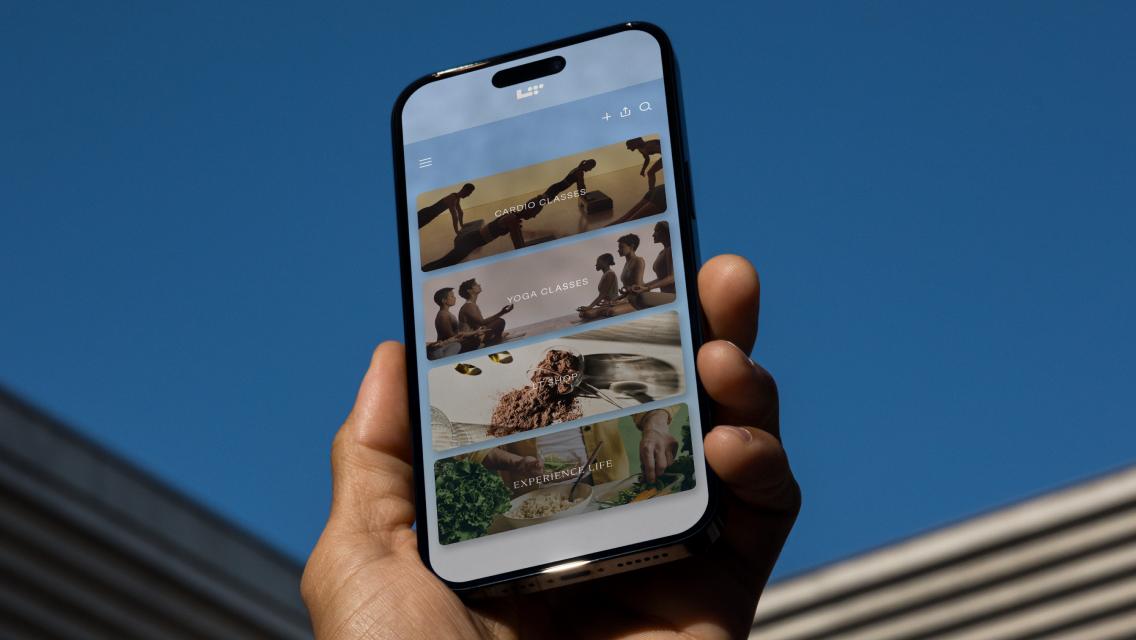



Living healthy can be a challenge — especially with all the obstacles our modern world presents. The Life Time app is all about making healthy living a little easier, whether you live near a Life Time athletic country club or not.
With just a few taps on your phone, you can do everything from your daily workout or a guided meditation to asking L•AI•C, Life Time’s AI companion, for insights on all your health and wellness questions. Live near a Life Time? You can schedule a fitness class, book a pickleball court, or find the hours for the child center, too.
To help you unlock the full potential of the Life Time app, we rounded up all the ways you can use it and discover everything it has to offer.
At Home or On the Go
Ask L•AI•C: L•AI•C (“lay-see”) is Life Time’s AI companion that can help with questions related to your health, your workouts, your Life Time membership, Life Time offerings, and more. For example, you might prompt L•AI•C to “Create a workout program for me based on my goal to build strength,” or to “Find open pickleball court times near me.” Or you might search, “How do I use the rower machine?” or “What’s a quick breathing exercise to reduce stress?”
Ask it questions about Life Time’s athletic country clubs, programs, and services, and you’ll get accurate and helpful information specific to your location. Ask for workout guidance or about anything health-related, and you’ll get answers based on scientifically backed content that’s informed by trainers, dietitians, and other health and wellness experts. (Learn more: “Just Ask L•AI•C: Life Time’s Health and Wellness Companion”).
The more you use L•AI•C, the more it can learn about you and be better able to tailor its responses to your preferences, interests, and goals.
Take an on-demand class: Enjoy the freedom of staying active on your own schedule, whether you’re traveling, short on time, or simply prefer to exercise in your own space. Each week in the Life Time app, you’ll find new on-demand classes — led by some of Life Time’s top instructors — aimed at helping you build strength, elevate your cardio, recover, and more.
Live stream a class: Do one of the classes on the live-stream schedule — they’re led by top Life Time instructors from across the nation every day.
Meditate: Meditation can help reduce stress, sharpen focus, and boost your emotional well-being. In the meditation section of the app, find guided meditations for mindfulness, calm, gratitude, purpose, breathwork, and more.
Build workouts and track progress over time: L•AI•C can help you create workouts that match your goals (they’re informed by a library of workouts designed by Life Time fitness professionals).
You can also search for workouts by select coaches or that target specific body parts. For example, if you’re looking for an upper body strength workout, simply search those words — “upper body strength workout” — and several options will appear. Other search examples might include, “Help me find an exercise for my biceps,” “Find me a program to increase body tone,” or “Tell me how to use the lat pull-down machine.”
You can even ask LAIC to build the type of workout you want and then add it directly to your app so that you can track reps, sets, and weights, and see your progress. You can schedule it for the day that works best for you, too.
Over time, L•AI•C will remember your workout preferences, ensuring that the workouts you’re completing and tracking are relevant to your specific health goals.
Go through programs that can help you reach specific goals: You’ll find a variety of fitness, nutrition, and lifestyle programs in the app. These time-based digital features vary in length and focus, offering something for everyone. (Learn more: “Take Your Pick: Which Life Time Digital Weight Loss & Training Program Is Right for You?”)
Explore nutrition supplements and wellness products on LT Shop: Scroll through the LT Shop section of the app to discover new or popular products or stay stocked on your favorites.
LT Shop is the home of LTH nutritionals, a line of supplements designed by top experts, dietitians, and trainers and formulated with pure ingredients and research-backed approaches. You can trust the products you’re finding are effective and held to rigorous quality standards.
Not sure where to start with supplementation? Take a quiz on LT Shop to find your recommended supplements based on guidance from registered dietitians.
Get healthy-living information from trusted experts: Experience Life features daily tips, advice, and perspectives from experts in every aspect of our business, as well as content from our award-winning magazine. In this section of the app, you’ll find fitness guidance from Dynamic Personal Trainers, nutrition tips and recipes from registered dietitians, family fun ideas from the Life Time Kids team, self-care strategies from LifeSpa technicians, and so much more.
Tune into the Life Time Talks podcast: Each episode of this award-winning podcast dives deep into different health and wellness topics, featuring conversations and tangible advice from experts in the Life Time family and beyond. Listen in the car, on a walk, as you cook dinner, or while you work out.
Inside the Club
For those with a membership to a Life Time club, there are several additional things you can do in the Life Time app to support your in-club experience.
Check in to the club: Your app is your membership card — simply navigate to the “card” icon and hold it up to be scanned at the front desk when you walk in.
Stay up to date on in-club happenings: Find all the details of your club or nearby clubs in your network, including hours, facilities, amenities, programs, services, and more under your profile section in the app (simply click your initials in the top left corner of the home screen).
Reserve classes and events: Explore the classes and events schedule at your club to learn more about all the options available to you and to reserve your spot ahead of time.
Invite a guest: Bringing a guest to the club? Invite them to use your guest passes via the Life Time app. They’ll be asked to download and use the app to check in when they arrive. (Learn more: “Grab a Guest: It’s Time to Go to the Club!”)
See and track your signature group training workouts: Alpha and GTX workouts are released in the Life Time app in four-week phases, allowing you to see your workouts ahead of time. This can help you plan your weekly schedule and track your progress along the way. At the end of each workout, you can go back in to log weight, speed, or other notes.
Book court time: Reserve a racquet-sport court for up to two hours when you navigate to the pickleball, tennis, racquetball, or squash tiles in the app.
Book a Dynamic Personal Training session: Select the Dynamic Personal Training tile to explore and learn more about the trainers at your club. Choose a complimentary “Get Started” session or book time to work with a trainer one-on-one.
Book Dynamic Stretch and Recovery services: Under the Dynamic Stretch and Recovery tile, discover the recovery amenities available at your club, reserve devices like Normatec compression technology, or book an assisted-stretch session with a Dynamic Stretch Specialist.
Schedule LifeSpa services: Navigate to the LifeSpa tile to arrange your hair, skin, nails, or massage services.
Register for kids camps, events, and classes: Under the Kids tile, you can register your child for year-round kids camps and events at your club. You can also see what’s on the schedule for them at the Kids Academy.
Order from the LifeCafe: Use mobile-app ordering to get your post-workout shake or healthy meal even faster.
Manage your membership: Managing your account or finding support is easy when you navigate to the “My Account” section of the app. Access your member information, billing history, activity and visit details, and more.
Discover more about Life Time: Each area of the club experience has a tile in the “Explore” section of the app. Browse to learn more about everything Life Time provides to help you live your happiest, healthiest life.
Note: Amenities may vary by club.